Automatic kernel upgrade for Custom image from MaaS

Hi @r00ta /@troyanov /all I can see that one of my Ubuntu 24- 6.8.0-87-generic custom image with mellanox ofed package gets failed deployment which was working earlier throwing kernel related errors as below. I am suspecting kernel might got upgraded, Is MaaS automatically updates image kernel while deployment? How can I stop that.

Find the installation output logs below

Building module:
        Cleaning build area...(bad exit status: 2)
        ./configure --with-kernel-dir=/lib/modules/6.8.0-88-generic/build && cd kernel && make...(bad exit status: 1)
        ERROR: Cannot create report: [Errno 17] File exists: '/var/crash/xpmem-dkms.0.crash'
        Error! Bad return status for module build on kernel: 6.8.0-88-generic (x86_64)
        Consult /var/lib/dkms/xpmem/2.7.4/build/make.log for more information.
        dkms autoinstall on 6.8.0-88-generic/x86_64 succeeded for iser isert kernel-mft-dkms knem mlnx-ofed-kernel nvidia-srv srp
        dkms autoinstall on 6.8.0-88-generic/x86_64 failed for xpmem(10)
        Error! One or more modules failed to install during autoinstall.
        Refer to previous errors for more information.
         * dkms: autoinstall for kernel 6.8.0-88-generic
           ...fail!
        run-parts: /etc/kernel/postinst.d/dkms exited with return code 11
        dpkg: error processing package linux-image-6.8.0-88-generic (--configure):
         installed linux-image-6.8.0-88-generic package post-installation script subprocess returned error exit status 11
        No apport report written because MaxReports is reached already
        Errors were encountered while processing:
         linux-headers-6.8.0-88-generic
         linux-headers-generic
         linux-headers-virtual
         linux-generic
         linux-virtual
         linux-image-6.8.0-88-generic
        needrestart is being skipped since dpkg has failed
        E: Sub-process /usr/bin/dpkg returned an error code (1)
        Running command ['udevadm', 'settle'] with allowed return codes [0] (capture=False)
        TIMED subp(['udevadm', 'settle']): 0.005
        Running command ['mount', '--make-private', '/tmp/tmpp4zv8umm/target/sys/firmware/efi/efivars'] with allowed return codes [0] (capture=False)
        Running command ['umount', '/tmp/tmpp4zv8umm/target/sys/firmware/efi/efivars'] with allowed return codes [0] (capture=False)
        Running command ['mount', '--make-private', '/tmp/tmpp4zv8umm/target/sys'] with allowed return codes [0] (capture=False)
        Running command ['umount', '/tmp/tmpp4zv8umm/target/sys'] with allowed return codes [0] (capture=False)
        Running command ['mount', '--make-private', '/tmp/tmpp4zv8umm/target/run'] with allowed return codes [0] (capture=False)
        Running command ['umount', '/tmp/tmpp4zv8umm/target/run'] with allowed return codes [0] (capture=False)
        Running command ['mount', '--make-private', '/tmp/tmpp4zv8umm/target/proc'] with allowed return codes [0] (capture=False)
        Running command ['umount', '/tmp/tmpp4zv8umm/target/proc'] with allowed return codes [0] (capture=False)
        Running command ['mount', '--make-private', '/tmp/tmpp4zv8umm/target/dev'] with allowed return codes [0] (capture=False)
        Running command ['umount', '/tmp/tmpp4zv8umm/target/dev'] with allowed return codes [0] (capture=False)
        finish: cmd-install/stage-curthooks/builtin/cmd-curthooks/installing-kernel: FAIL: installing kernel
        finish: cmd-install/stage-curthooks/builtin/cmd-curthooks: FAIL: curtin command curthooks
        Traceback (most recent call last):
          File "/curtin/curtin/commands/curthooks.py", line 399, in install_kernel
            map_suffix = mapping[codename][version]
                         ~~~~~~~^^^^^^^^^^
        KeyError: 'noble'
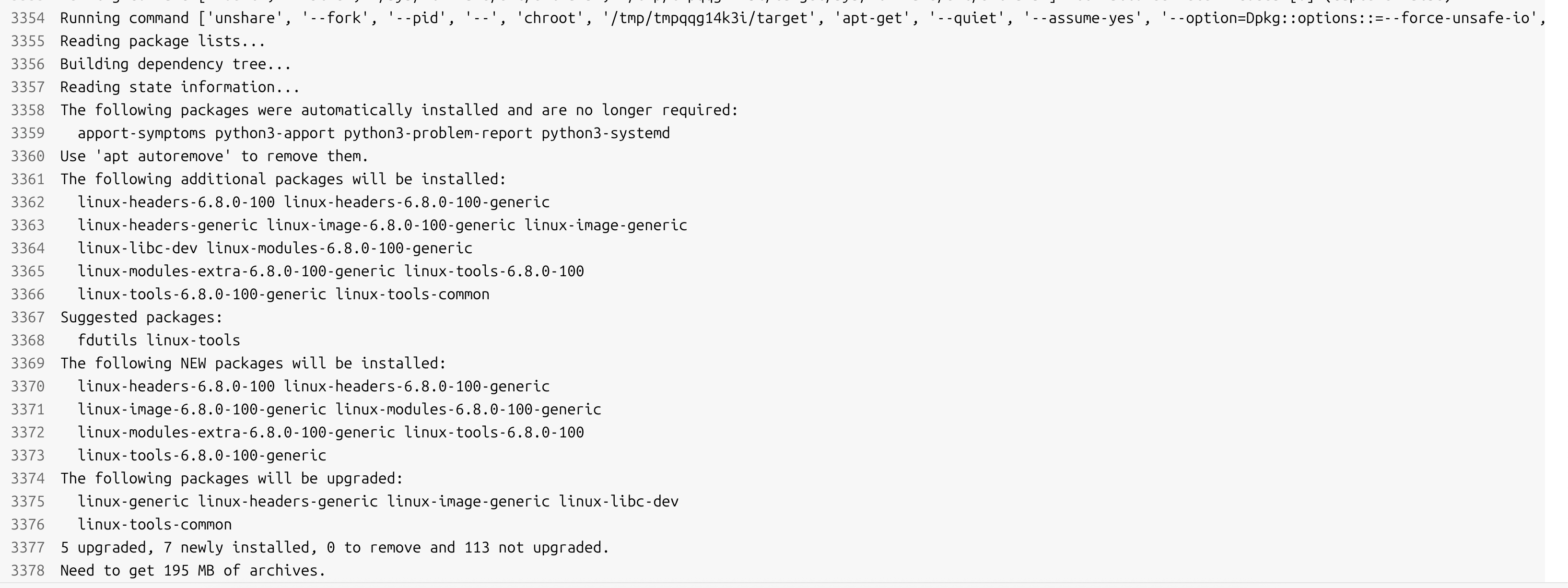
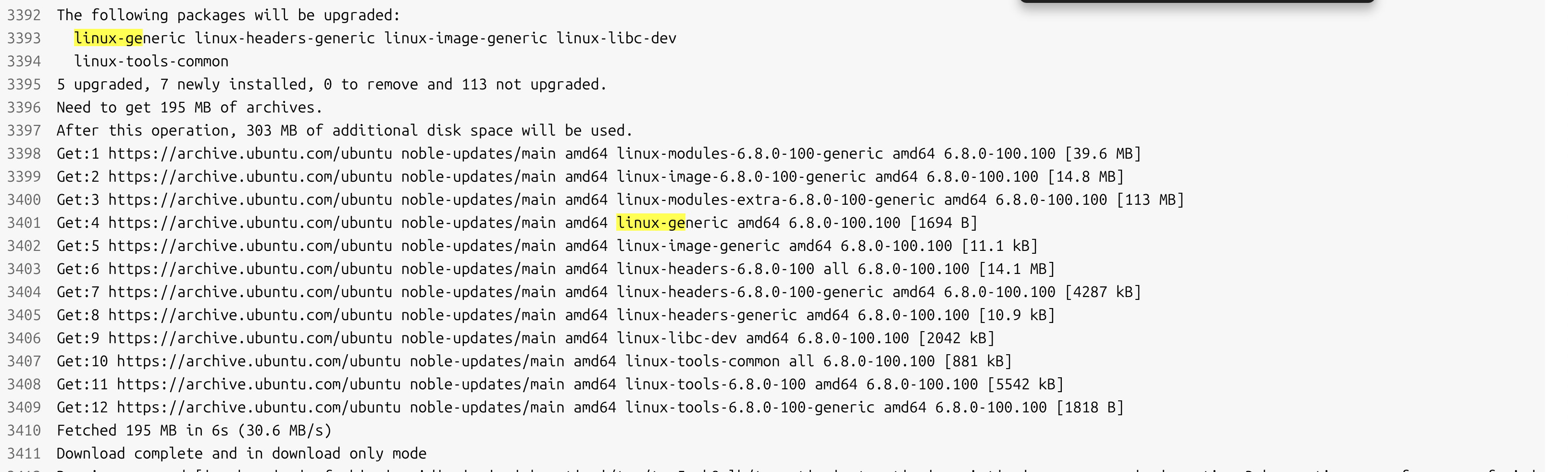
When you create your image with packer-maas you also specify the curthooks. It should be in there

Can I get any reference

it depends on the template you used to build your custom image, btw packer-maas/ubuntu/scripts at main · canonical/packer-maas · GitHub

You can control the kernel version during deployment with a custom Curtin userdata file.
Assuming you’re on the Snap-based install, create a file called /var/snap/maas/current/preseeds/curtin_userdata_ubuntu and put in the following content:

#cloud-config
kernel:
  package: linux-image-6.8.0-87-generic
  flavor: hwe
debconf_selections:
 maas: |
  {{for line in str(curtin_preseed).splitlines()}}
  {{line}}
  {{endfor}}
late_commands:
  maas: [wget, '--no-proxy', {{node_disable_pxe_url|escape.json}}, '--post-data', {{node_disable_pxe_data|escape.json}}, '-O', '/dev/null']
  extra_modules: ["curtin", "in-target", "--", "apt", "install", "-y", "--allow-change-held-packages", "linux-modules-extra-6.8.0-87-generic"]

This will pin the Ubuntu kernel to the version you want, instead of always installing the latest one.

Thanks @kevin-reeuwijk /@r00ta … my doubt is if I pin the kernel 6.8.0-87-generic which is for Ubuntu 24, I also deploy servers Ubuntu 22 with kernel 5.15.0-161-generic from the same MaaS… so will it make any issue ? since in curtin file Ubuntu 24 is pinned.

You can have different templates Custom machine setup

@akashram611 as long as you use the builtin Ubuntu images, you can differentiate curtin files by name:

  • Ubuntu 22.04 → curtin_userdata_ubuntu_amd64_generic_jammy
  • Ubuntu 24.04 → curtin_userdata_ubuntu_amd64_generic_noble

Unfortunately this doesn’t work for custom images, where the only usable curtin filename is curtin_userdata_custom.

We are also facing similar problem, our custom image is built with linux-image-6.8.0-88-generic kernel but post deployment kernel is automatically getting upgraded with latest one from external repos via curtin, This is creating discrepancy in kernel versions with our servers even though they built with same image, Please let me know the solution to overcome this problem

Hi @r00ta @kevin-reeuwijk , I added the below curtin script in preseeds. The current image has linux-image-6.8.0-90-generic kernel preinstalled in the image template… and the curtain configured will retain this kernel but also wont remove linux-image-6.8.0-101-generic which is injected by MaaS. If i force remove it affects other drivers such as nvidia driver. Kindly help if this way works.. if so kindly help in fixing this issue. Attached my output & curtin script below.

uname -r
6.8.0-90-generic

dpkg -l | grep linux-image
ii  linux-image-6.8.0-101-generic         6.8.0-101.101                                 amd64        Signed kernel image generic
hi  linux-image-6.8.0-90-generic          6.8.0-90.91                                   amd64        Signed kernel image generic
ii  linux-image-virtual                   6.8.0-101.101                                 amd64        Virtual Linux kernel image

Curtin script used

#cloud-config
kernel:
  package: linux-image-6.8.0-90-generic
  flavor: generic

debconf_selections:
 maas: |
  {{for line in str(curtin_preseed).splitlines()}}
  {{line}}
  {{endfor}}

late_commands:


  01_hold_generic: ["curtin", "in-target", "--", "apt-mark", "hold", "linux-generic", "linux-image-generic", "linux-headers-generic"]
  03_ensure_90: ["curtin", "in-target", "--", "apt-get", "install", "-y", "linux-image-6.8.0-90-generic", "linux-modules-extra-6.8.0-90-generic"]
  04_hold_90: ["curtin", "in-target", "--", "apt-mark", "hold", "linux-image-6.8.0-90-generic", "linux-modules-6.8.0-90-generic", "linux-modules-extra-6.8.0-90-generic"]
  05_set_grub_default: ["curtin", "in-target", "--", "sh", "-c", "sed -i 's/GRUB_DEFAULT=0/GRUB_DEFAULT=\"Advanced options for Ubuntu>Ubuntu, with Linux 6.8.0-90-generic\"/' /etc/default/grub"]
  06_update_grub: ["curtin", "in-target", "--", "update-grub"]

  maas: [wget, '--no-proxy', '{{node_disable_pxe_url}}', '--post-data', '{{node_disable_pxe_data}}', '-O', '/dev/null']

Hi @akashram611, based on your curtin script, you should not see that behavior. The kernel.package parameter overrides the MaaS behavior to install the latest kernel version; instead it installs the version you specified. So if you’re seeing both the 6.8.0-90 and 6.8.0-101 version in your image after deployment (while specifying the 6.8.0-90 in curtin), that means the 6.8.0-101 version was actually present in the source image.

Whenever a newer kernel version gets installed, that automatically becomes the default boot option, so adjusting Grub isn’t necessary.

Hence based on the above, it seems to me your source image has the 6.8.0-101 kernel and you’re installing an older kernel through curtin alongside it, which explains why you also have to adjust Grub.

Instead, I would recommend you just change the kernel version you install through curtin to 6.8.0-101. That cleans up the curtin file to this:

#cloud-config
kernel:
  package: linux-image-6.8.0-101-generic
  flavor: generic

debconf_selections:
 maas: |
  {{for line in str(curtin_preseed).splitlines()}}
  {{line}}
  {{endfor}}

late_commands:

  01_ensure_modules: ["curtin", "in-target", "--", "apt-get", "install", "-y", "linux-modules-extra-6.8.0-101-generic"]

  02_hold_kernel_1a: ["curtin", "in-target", "--", "apt-mark", "hold", "$(apt-mark showauto linux-\*image-\*)"]
  03_hold_kernel_2a: ["curtin", "in-target", "--", "apt-mark", "hold", "$(apt-mark showauto linux-\*headers-\*)"]
  04_hold_kernel_3a: ["curtin", "in-target", "--", "apt-mark", "hold", "$(apt-mark showauto linux-\*modules-\*)"]
  05_hold_kernel_1m: ["curtin", "in-target", "--", "apt-mark", "hold", "$(apt-mark showmanual linux-\*image-\*)"]
  06_hold_kernel_2m: ["curtin", "in-target", "--", "apt-mark", "hold", "$(apt-mark showmanual linux-\*headers-\*)"]
  07_hold_kernel_3m: ["curtin", "in-target", "--", "apt-mark", "hold", "$(apt-mark showmanual linux-\*modules-\*)"]

  maas: [wget, '--no-proxy', '{{node_disable_pxe_url}}', '--post-data', '{{node_disable_pxe_data}}', '-O', '/dev/null']

Hi @kevin-reeuwijk to be more clear. I only want to have kernel version 6.8.0-90 in my deployed machines. In my source image also I included kernel version 6.8.0-90 only. You can see the image script.

#!/bin/bash
apt-get update
apt-get install -y cloud-init
KERNEL_VERSION="6.8.0-90"
apt-get install -y \
            linux-image-${KERNEL_VERSION}-generic \
            linux-headers-${KERNEL_VERSION}-generic \
            linux-modules-${KERNEL_VERSION}-generic

echo "=== Removing HWE meta packages (prevent auto kernel switch) ==="
apt-get remove -y linux-generic-hwe-24.04 || true

echo "=== Holding Kernel Packages (Prevent Auto Upgrade) ==="
apt-mark hold \
            linux-image-${KERNEL_VERSION}-generic \
            linux-headers-${KERNEL_VERSION}-generic \
            linux-modules-${KERNEL_VERSION}-generic
echo "=== Update GRUB ==="
update-grub