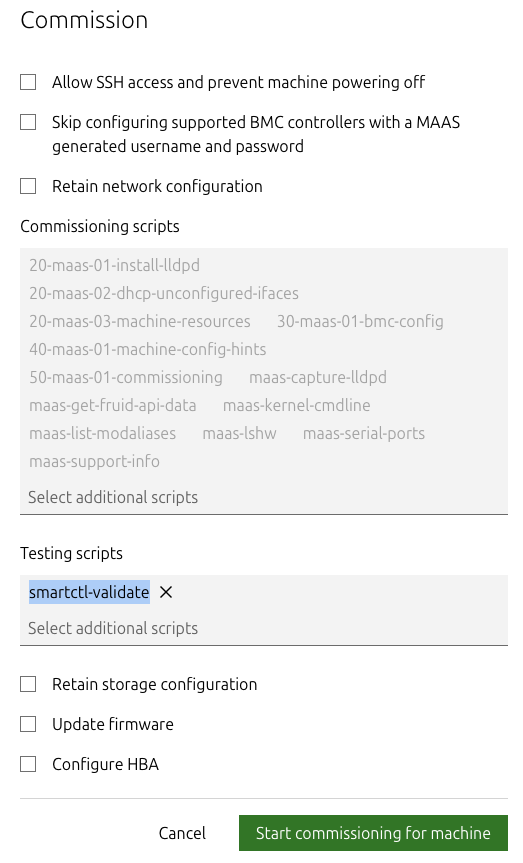
Hello
I created a script and I want to run it at the end of commissioning, but then I added it to list, it wasn’t enabled automatically. I can see there only default script there “smartctl-validate”, so I have to add mine manually. As I understand if I add tag “commissioning” and script_type “test”.
it should appear there automatically, but it wasn’t.
Can someone help with it?
#!/bin/bash
#
# maas-commissioning-netbox - Run hook to post commissioning deploy with some test
#
#
# --- Start MAAS 1.0 script metadata ---
# name: maas-commissioning-netbox
# title: Netbox configure test
# description: Run hook to post commissioning deploy with some test
# tags: commissioning
# script_type: test
# parallel: instance
# timeout: 00:05:00
# --- End MAAS 1.0 script metadata ---

echo "maas-commissioning-netbox-test"
Hi @kisloid
IIRC it should be script_type not tag, e.g.:
script_type: commissioning
Tags is just to note list of tags associated with this script
Looks like I was not so clear
I need to runt this script in “Testing scripts” section. Coz I want to run hook to configure partitions automaticaly.
script_type: test in that case
1 Like
I’ve tried this and unfortunately it didn’t help
I think that need to change parameter “default”
maas admin node-script read 83-test-script
Machine-readable output follows:
{
    "name": "83-test-script",
    "title": "test configure set",
    "description": "Run hook to post commissioning deploy with some test",
    "tags": [
        "commissioning",
        "auto",
        "storage"
    ],
.
.
.
    "default": false,
.
.
.
}
I don’t think I understand what you are trying to achieve and what exactly doesn’t work for you. Can you share full contents of the script and how you’ve uploaded it and what you are expecting to achieve?
type (string): Optional. The script_type defines when the script should be used: `commissioning` or `testing` or `release`. Defaults to `testing`.
Thanks for helping
I need to run custom script in “testing” section automatically when I run commissioning (like “smartctl-validate” on screenshot). I mean that when I press commissioning I want to see this script already added in section “testing” and I don’t need to choose it manually from the list.
adding script
maas admin node-scripts create -d name=83-test-script script@=83-test-script.sh tags=commissioning type=testing
here is the script
#!/bin/bash
#
# 83-test-script.sh
#
# --- Start MAAS 1.0 script metadata ---
# title: 83-test-script.sh
# description: 83-test-script.sh
# parallel: instance
# timeout: 00:05:00
# --- End MAAS 1.0 script metadata ---

echo "maas-commissioning-netbox"
# curl some hook
here is output after adding
Machine-readable output follows:
{
    "name": "83-test-script",
    "title": "83-test-script.sh",
    "description": "83-test-script.sh",
    "tags": [
        "commissioning",
        "node"
    ],
    "hardware_type": 0,
    "parallel": 1,
    "results": {},
    "parameters": {},
    "packages": {},
    "timeout": "0:05:00",
    "destructive": false,
    "default": false,
    "for_hardware": [],
    "may_reboot": false,
    "recommission": false,
    "apply_configured_networking": false,
    "parallel_name": "Run along other instances of this script",
    "type": 2,
    "type_name": "Testing script",
    "hardware_type_name": "Node",
    "id": 66,
    "history": [
        {
            "id": 102,
            "comment": null,
            "created": "Wed, 19 Nov 2025 10:26:32 +0000"
        }
    ],
    "resource_uri": "/MAAS/api/2.0/scripts/83-test-script"
}
P/S/ my suggestion regarding default was wrong. this parameter just locked script like other defaults scripts
Ah, now I follow. Thanks for the explanation.
Thats actually looks like a nice feature request.
AFAIK there is no way to do it, but one thing you can try is to set the default field in the database to true for your script in maasserver_script table