
Hi all,

I’m commissioning Kamrui mini PCs in MAAS 3.6.2 using Ubuntu 24.04 images. The onboard NIC is:

Realtek Semiconductor Co., Ltd. RTL8111/8168/8211/8411 PCI Express Gigabit Ethernet Controller
Variant shown as rtl8168h

Symptom:
- PXE boot begins and the ephemeral commissioning environment starts, but networking becomes unstable and commissioning fails/timeouts (intermittent link / no DHCP renew / loses connectivity mid-commissioning).

What I’ve already tried:
- BIOS/UEFI checks (UEFI PXE IPv4, Secure Boot off, Fast Boot off, Network Stack enabled)
- Multiple kernel boot parameters intended to improve Realtek stability during early boot (no improvement)

Questions:
1) Are there known MAAS 3.6.x + Ubuntu 24.04 commissioning issues with rtl8168h/RTL8111/8168 hardware?
2) Is there a recommended MAAS-supported approach to handle problematic Realtek PXE/commissioning reliability (e.g., specific Ubuntu 24.04 kernel stream, firmware updates, or MAAS settings)?
3) What logs should I capture from MAAS and/or the ephemeral environment to pinpoint whether this is driver, firmware, or DHCP/TFTP/HTTP boot path related?

Environment:
- MAAS: 3.6.2
- Ubuntu: 24.04 image
- Commissioning kernel version:  tried all hwe versions.

Thanks!
I believe Ubuntu 24.04 does not have the drivers for that. You would need 24.10 or 25.04 but they can’t be used for commissioning, you’ll have to wait until 26.04 is out
You might try to install Ubuntu 24.04 from a USB stick and check if that’s the case
oh, I just checked and it’s an old card, so it should work. Maybe you have 2 dhcp servers on the network?
Thanks, good thought. I don’t think it’s dual-DHCP: I have an HP G3 on the same VLAN/subnet and it PXE/commissions in MAAS without issues.
I’ll still double-check for rogue DHCP/ProxyDHCP by capturing DHCP traffic during a failed Kamrui PXE attempt (looking for multiple DHCPOFFERs / conflicting next-server/bootfile). If you have any specific MAAS logs/screens you want me to post, let me know.
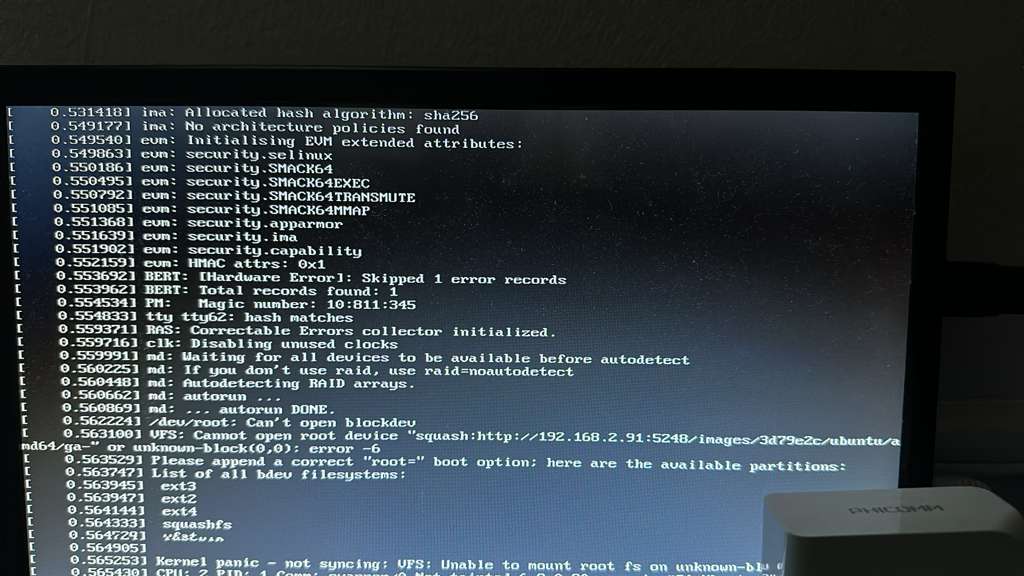
a screenshot of the serial console with the stacktrace is a good start
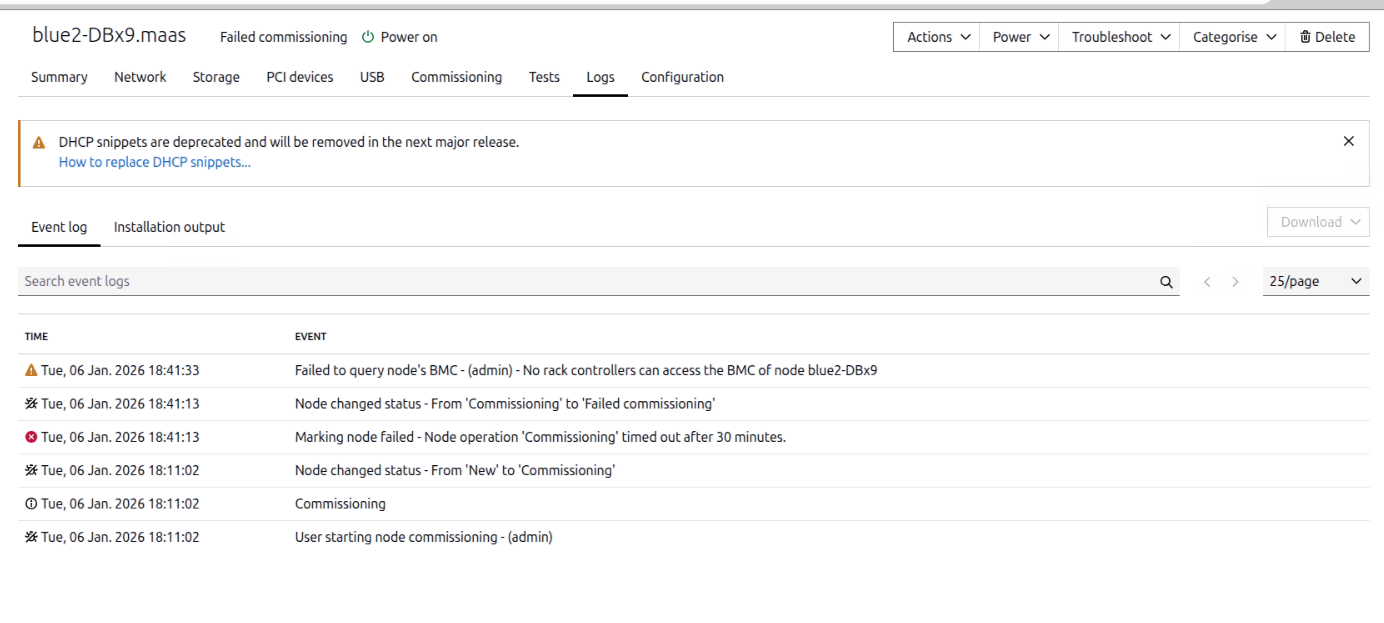
The serial console of the machine, not MAAS
0.531418] ima: Allocated hash algorithm: sha256
0.549177] ima: No architecture policies found
0.549540] evm: Initialising EVM extended attributes:
0.549863] evm: security.selinux
0.550186] evm: security.SMACK64
0.550495] evm: security.SMACK64EXEC
0.550792] evm: security.SMACK64TRANSMUTE
0.551085] evm: security.SMACK64MMAP
0.551368] evm: security.apparmor
0.551639] evm: security.ima
0.551902] evm: security.capability
0.552159] evm: HMAC attrs: 0x1
0.553692] BERT: [Hardware Error]: Skipped 1 error records
0.553962] BERT: Total records found: 1
0.553971] PM: Magic number: 10:811:345
0.554833] tty ttyb2: hash matches
0.559371] RAS: Correctable Errors collector initialized.
0.559716] clk: Disabling unused clocks
0.559991] md: Waiting for all devices to be available before autodetect
0.560225] md: If you don't use raid, use raid=noautodetect
0.560448] md: Autodetecting RAID arrays.
0.560662] md: autorun
0.560893] md: ... autorun DONE.
0.562224] /dev/root: Can’t open blockdev
0.563100] VFS: Cannot open root device 'squash:http://192.168.2.91:5248/images/3d79e2c/ubuntu…' or unknown-block(0,0): error -6
0.565239] Please append a correct “root=” boot option; here are the available partitions:
0.563747] List of all bdev filesystems:
0.563945] ext3
0.563947] ext2
0.564144] ext4
0.564333] squashfs
0.564729] vfat
0.565253] Kernel panic - not syncing: VFS: Unable to mount root fs on unknown-block(0,0)
Maybe this machine is using legacy bios? Change this setting in MAAS for that machine in order to match that
is there a next step for this?
Am getting the same as this post; thank you @desmond-muyukha.
Checked, per chatgbt it states to use UEFI and using for IPV4, is this acceptable as not legacy bios?
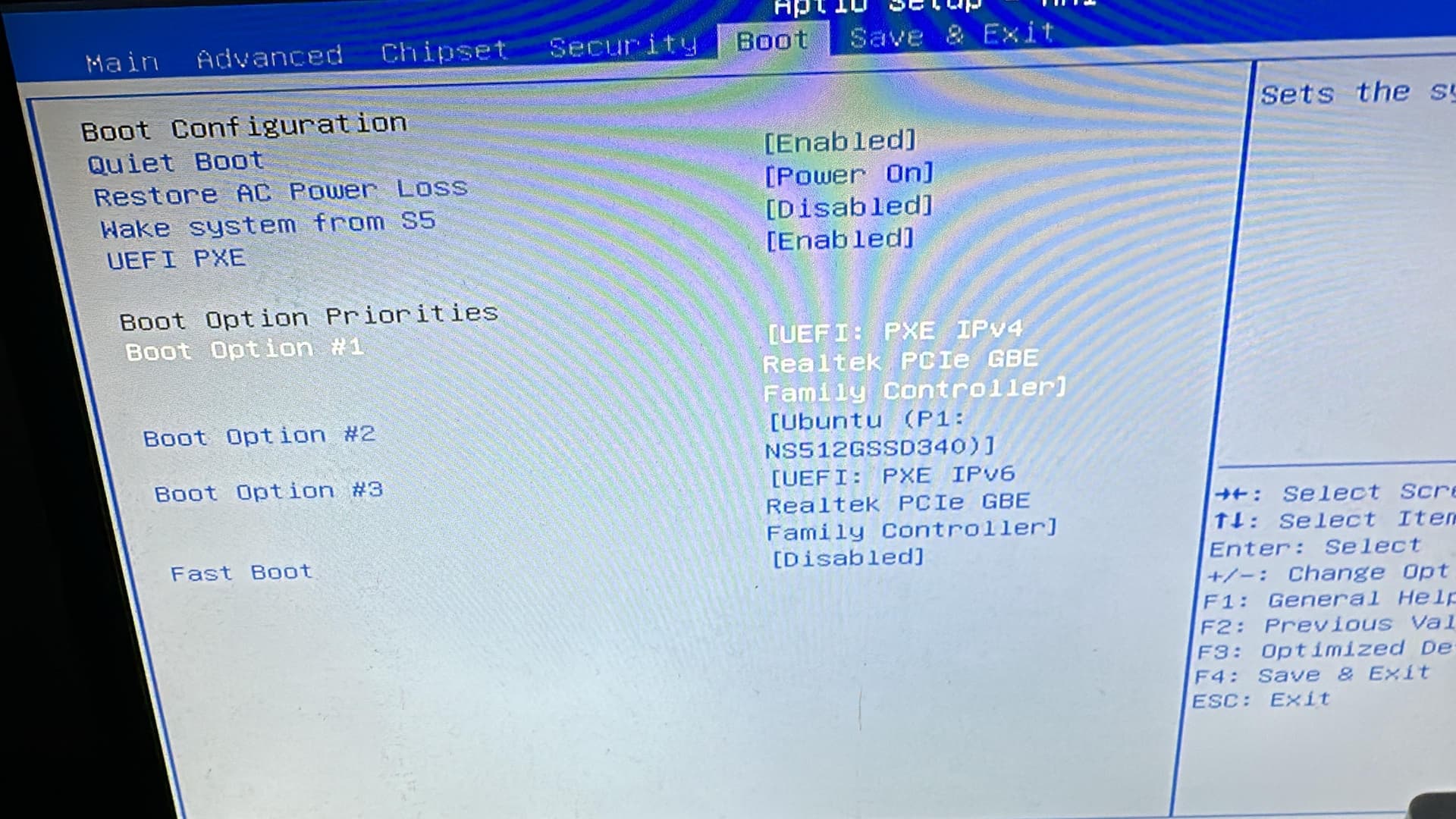
I’m surprised chatgbt does not know how to fix this. Maybe you can just try harder with that
The Kamrui AK1 Pro is the only system that has been problematic.
-
It has successfully PXE-booted and deployed a small number of times
-
However, behavior is intermittent and non-deterministic
-
Identical automation and cadence that works elsewhere fails here
-
Considerable time has been spent over many months troubleshooting (BIOS, PXE, MAAS, Terraform, power cycling, etc.)
Observed Characteristics
-
UEFI PXE enabled and prioritized
-
IPv4 PXE only
-
Power cycling is consistent and controlled
-
Failures occur at various PXE stages (sometimes DHCP-related, sometimes post-DHCP)
-
Behavior may degrade after repeated power cycles
-
No comparable issues on other hardware using the same MAAS instance
What I’m Trying to Determine
At this point, I’m trying to understand whether there is:
-
A known firmware or PXE limitation with the Kamrui AK1 Pro
-
A Realtek NIC PXE / UEFI instability others have encountered
-
MAC address instability, NVRAM persistence issues, or PXE stack bugs specific to this model
-
Or if this platform is simply not well-suited for MAAS-style automation, despite working occasionally
I’m not looking for basic PXE or MAAS setup steps — those are already validated by other hardware in the same environment. I’m specifically seeking hardware- or firmware-level insights, confirmations, or known limitations with this model.
Any experience, confirmation, or deep-dive pointers would be greatly appreciated. Even knowing that others have seen similar behavior would help determine whether further time investment makes sense.
Thank you for reading and for any guidance you can offer.