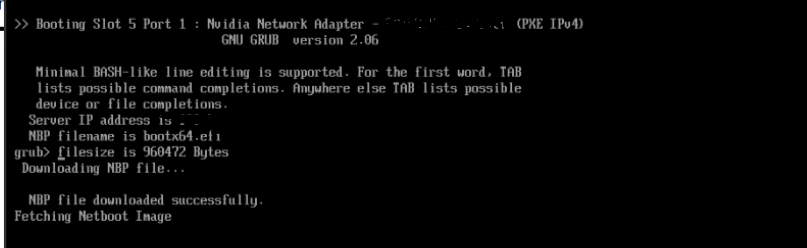
Hi @r00ta /@troyanov /@all There is an option in MaaS GUI for Powering on and off the server, and its working fine but for HPE DL380Gen11 server, when we trigger power on from MaaS UI. The server powers on and stucks on the boot screen and not proceeding further. But if we are doing the same from the ILO server is booting fine. This issue is noted only when triggered from the MaaS UI. This is happening specifically only to this server other types of server are fine. Can anyone give a fix for this please.
Please ensure you have the latest greatest HPE firmwares installed on your server
Hi @r00ta we will check regarding firmware. But for HPE DL380 Gen11 servers alone we are using custom power configurations as below, which is become of a power loop issue we faced and it is mentioned in Bug #2112206 “Powerloop on HPE ProLiant DL385 and DL360 " : Bugs : MAAS
So will these changes impact anything?
Power boot type: Automatic
Cipher Suite ID: 17
Privilege Level: Operator
Workaround Flags: Opensesspriv, Nochecksumcheck
I don’t think so. I know another person had the same problem and upgrading the firmware fixed it
Otherwise, there is something wrong with your card. I see it’s pxe booting from an nvidia device, maybe you can try with the onboard nics instead?
Hi @r00ta we tried upgrading firmware aswell it still didnt helped. Regarding the card, we are using Nvidia Bluefield card only to boot the machine. We use the same card for all types of servers & we dont see such issue.
I’d suggest to take a tcpdump to see where the machine gets stuck. You can also take it while booting another machine that works fine and you compare the two (in case you don’t know the details of the boot process)
Hi @r00ta / @akashram611 I recently stumbled upon the same problem using HP DL 385 gen11 hardware with 10/25Gb 2-port SFP28 BCM57414 OCP3 Adapter. Im not able even to commission the HPE server because I get stuck in the grub console.
I work with following firmware (latest) versions:
-
10/25Gb 2-port SFP28 BCM57414 OCP3 Adapter - 237.1.148.0
-
Systems firmware - A55 v3.14 (04/30/2026)
During the commissioning I dumped the network communication on rackd side and see:
-
Valid DHCP DORA exchange
-
HPE server successfully acquired bootx64.efi trough TFTP
-
HPE server successfully acquired grubx64.efi trough TFTP
-
After that no more communication from the HPE server could be seen
So I checked the networking settings from grub console on HPE server and managed to find a root of problem:
grub> net_ls_cards
efinet5 14:23:f3:ff:ff:b5
efinet4 14:23:f3:ff:ff:b5
efinet3 14:23:f3:ff:ff:b5
efinet2 14:23:f3:ff:ff:b4
efinet1 14:23:f3:ff:ff:b4
efinet0 14:23:f3:ff:ff:b4
Multiple network interfaces share same MAC address. It looks like HPE servers are virtualizing the network card into multiple interfaces.
The issue is that grub somehow assigns IP address and routes on the efinet2 interface:
grub> net_ls_addr
efinet2 14:23:f3:ff:ff:b4 10.0.0.219
grub> net_ls_routes
efinet2:default 0.0.0.0/0 gw 10.0.0.1
efinet2:local 10.0.0.0/24 efinet2
When I change the routes and the IP assignment to efinet0 an source (memdisk)/grub.cfg im able to continue with the boot.
I spent a whole day trying to configure server’s BIOS settings but I did not manage to turn of that virtualization. Are there any steps to generate own grubx64.efi images in order to modify (memdisk)/grub.cfg? Or any other workarounds other than manual intervence on every boot?
can you try using Resolute (26.04) as commissioning image?
Tried 26.04 as commissioning image. Same results. Previous attempts were on 24.04 image.
looks like an HPE bug. Have you tried to reach out to their support?
Hi @matkm Try to powering on manually during the first time commissioning.
Hi @akashram611 . Thanks for the response. I tried it when I read this post for the first time. Without success. Now Im trying to get help trough HPE support. If manage to find any fix I will post it here.
